
From a story about your process to a runnable flow, in minutes.
Describe how the work runs today. FlowSharp builds the structure first, then enriches it, and never loses your draft.
- For
- Process owner
- IT
The problem
Drawing a process from scratch takes hours of workshops and a first sketch nobody has time to make. Tools that "generate the workflow in one click" deliver an all-or-nothing result: if something is off you start over, and the generated flow often cannot even be published. The process owner is left alone in front of a blank whiteboard, or in front of a draft they do not understand. Either way the real cost is not the drawing itself but the time lost before there is anything to discuss: knowledge of the process lives in the heads of the people who run it, and moving it into a model takes patient translation few teams can afford. FlowSharp tackles the problem the other way round: it starts from the story, builds a draft you can correct one step at a time, and keeps that draft safe while it grows.
Canvas, first wave
- Stage: Request
- Stage: Check
- Stage: Approval
Canvas, second wave
- + activities, assignees, timings
Copilot
- User: double approval above €5,000
- 3 changes applied to the draft
How it works
- 1
You tell the story
In natural language: who does what, when approval happens, what follows when a document is missing. You can also start from an existing procedure pasted into the prompt, with no need to rewrite it. You do not need to know the designer's notation: what matters is the sequence of work, the people involved and the exceptions you already know.
- 2
Structure comes first
The AI proposes stages and links, which appear on the canvas one at a time so you can follow the logic as it forms. The skeleton is saved immediately: from that point on the draft is never lost, even if the next generation step is interrupted.
- 3
Then the detail
In a second pass the AI adds activities, assignees and timings without changing the names and links already decided. If a step fails, only that step is retried: work already done is not thrown away. Assisted generation can also propose the data schema and the input forms.
- 4
Refine with the Copilot
"Add a double approval above €5,000", "set a 2-day timeout on the check". The Copilot edits the draft one step at a time, checks field limits and corrects itself before saving. If the server rejects a change, it offers "Fix automatically". Every request works on the draft, never on the published version.
Specifications
| Creation modes | from scratch, with AI, from import (file, pasted JSON, URL) |
|---|---|
| Generation | in two steps: structure, then detail |
| Persistence | skeleton saved immediately; retry of the single failed step |
| Copilot | natural-language edits, with automatic correction of field limits |
| Assisted generation | data schema and input forms |
| Publishing | always subject to pre-publish checks (reachable end state, no dead ends) |
An operational example: from description to draft
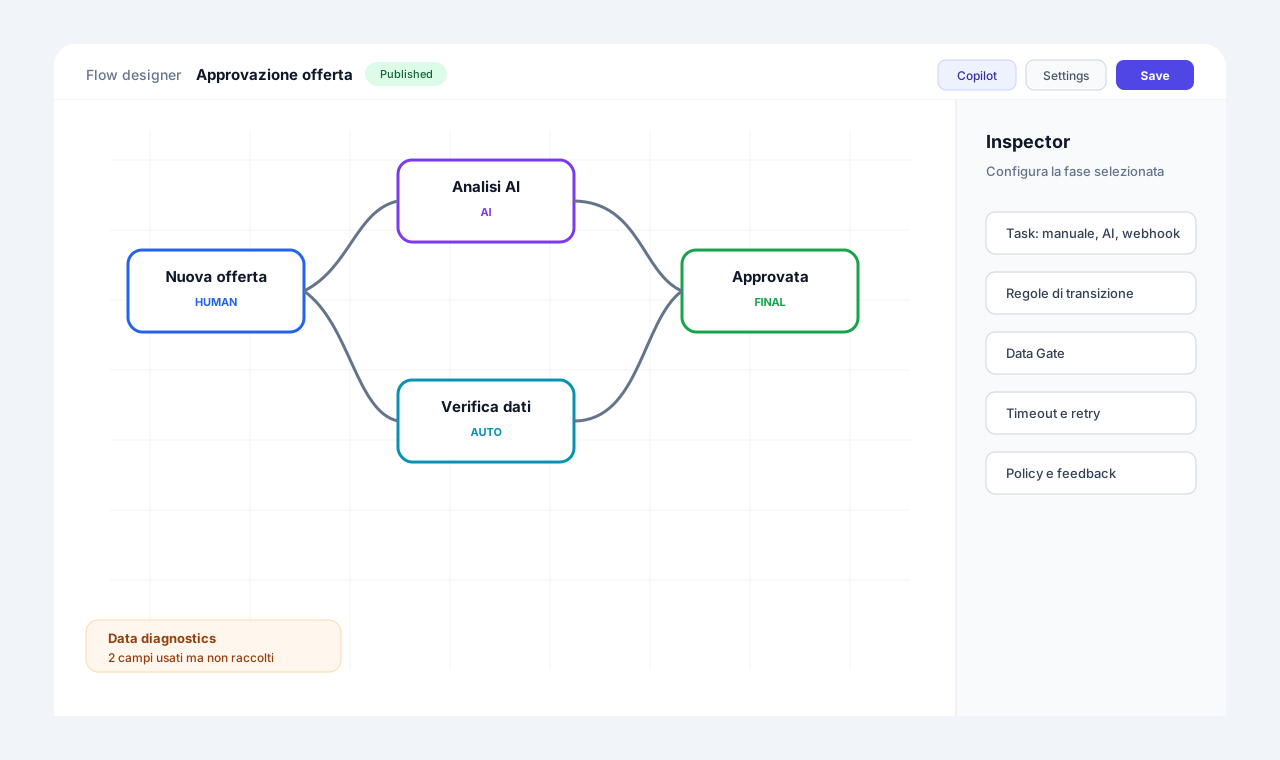
Picture a process owner who describes an approval process in words: request, check, approval. Generation runs in two waves. In the first wave the skeleton appears on the canvas, that is the stages: Request, Check, Approval. In the second wave the draft is enriched with activities, assignees and timings. The owner does not have to draw anything from scratch, but remains the one who decides what to keep. At this point they open the Copilot and write, for example, that above €5,000 a double approval is needed. The Copilot applies the changes to the draft and reports how many, three in the example. Everything happens on the draft: the published flow and cases already running are not touched. The diagram beside it is illustrative and shows the sequence, not an official screenshot. The practical point is that AI proposes and the person reviews: the result is a fast starting point, not a flow already in operation.
How to verify before publishing
A generated draft should be read like any draft. Check that each stage has a sensible owner, that timings match the reality of the department and that the requested rules have been translated into readable conditions. If something is off, ask the Copilot for the change in natural language or fix it by hand on the canvas: the two ways coexist on the same draft. Before publishing, the Flow Designer checks apply, verifying for example that a reachable end state exists. Then publishing creates a version: from that moment new cases use the published version, while the draft remains editable. For teams with governance requirements it is wise to note who reviewed the generated draft before publishing it. The value of AI here lies in the time saved on the blank page, not in giving up human review.
Related features
- Visual flow designerA canvas where stages are nodes and transitions are links, with all the detail in the side panel.
- Immutable versions and controlled publishingOne draft per version family; published versions are immutable snapshots.
- Living data contract and flow KPIsDeclared fields and fields observed in real use, with type and provenance, plus flow KPIs.
- Process templatesIncluded templates, such as order approval and ticket handling, and "My templates" with preview.
- Convert to Procedure (SOP) with AIA 3-step wizard generates an operating procedure from the flow in Italian or English.
Use cases
Frequently asked questions
Does the AI publish the flow on its own?
No. It generates a draft; publishing goes through the automatic checks and a person, who must confirm it with an explicit click.
Can I start from a process I have already documented?
Yes: paste the description or procedure into the prompt, or import an existing flow (file, pasted JSON or URL) and refine it with the Copilot.
What happens if generation is interrupted?
The skeleton is already saved. Only the failed step is retried, without redoing what has already been built.
Which AI is used?
The provider configured by your organization: the managed AI of the plan, or your own providers (OpenAI, OpenRouter, Ollama and compatible ones).