
Feature area
Process ROI, demonstrated
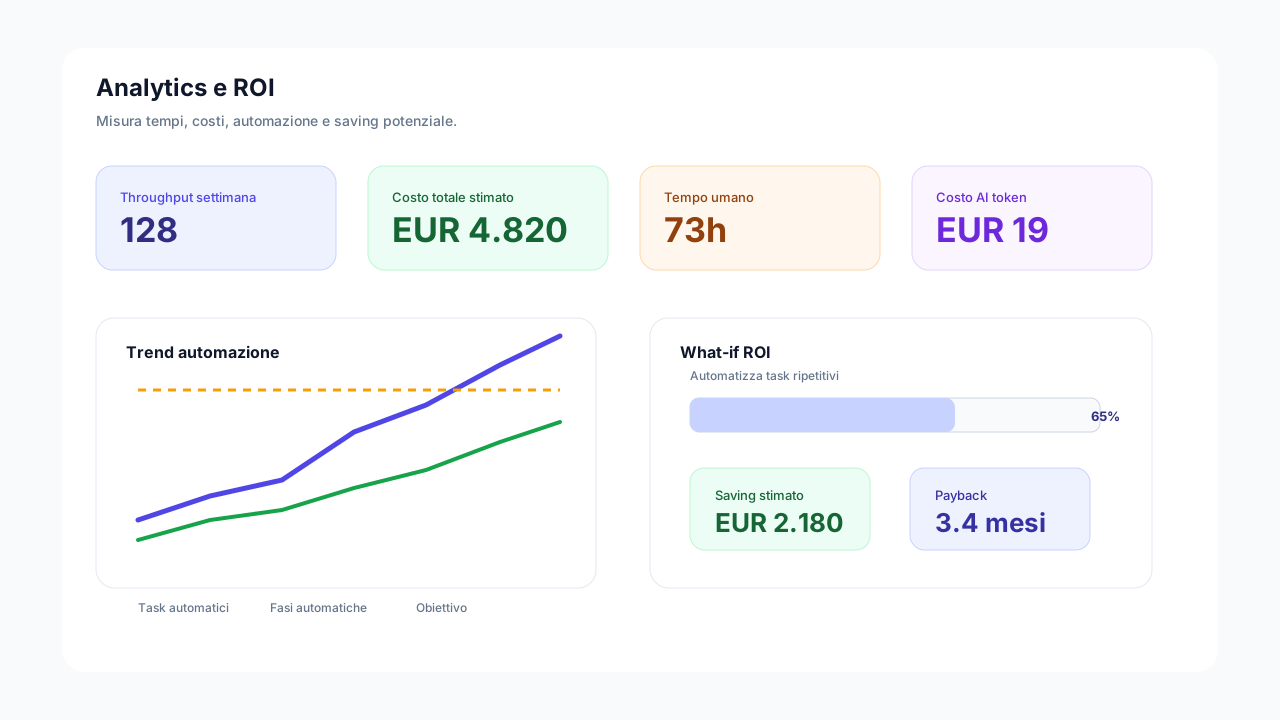
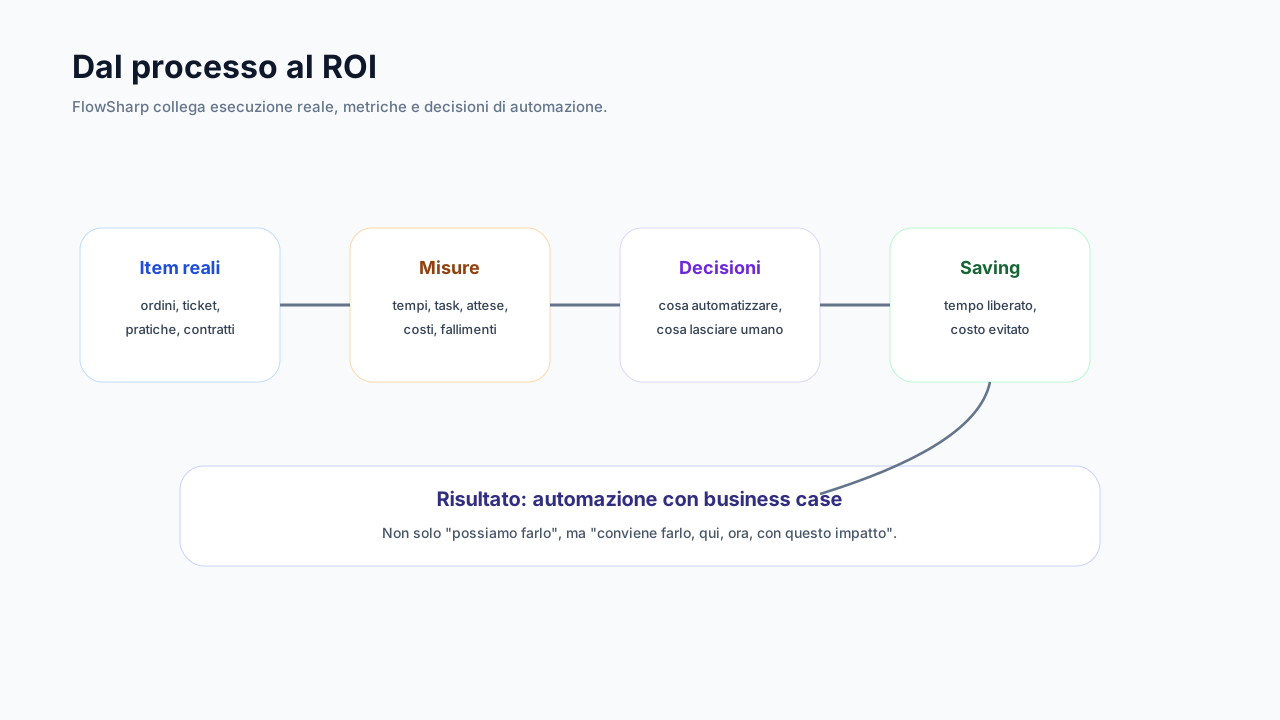
Automating only makes sense if you can prove it. The Analytics and ROI area takes the process from measurement to plan: the Analytics page shows costs, times and risks with the formula behind each indicator; the simulator and Implementation Plan turn opportunities into initiatives; the frozen baseline fixes the starting cost. Measured and estimated are always kept apart, and data gaps are declared.
Three problems this area solves
Saving is a promise
After the project nobody can say how much was truly saved compared with before.
Indicators without formula
A number without a method does not survive a question from the finance director.
Initiatives without an owner
Opportunities emerge in meetings and vanish because nobody owns them.
KPIs with history and forecast
Cards, gauges, targets or sparklines, with a forecast that says "insufficient history" rather than inventing.
History is snapshotted every night and the multi-KPI trend spans 30 to 365 days. The forecast carries a confidence band.
Technical details
- Targets evaluated every night; condition-change events can open cases.
Implementation Plan
An opportunity becomes an initiative with owner, date, starting cost, investment and expected saving.
The opportunity can come from diagnostics, What-if, AI analysis or the simulator. The final check compares the frozen cost with the measured cost.
Technical details
- Governed cycle: proposal, planning, work, go-live, verification.
- Cross-map summary without duplicates.
Frozen cost baseline
Observation period, data quality check and immutable freeze with a SHA-256 fingerprint.
Corrections are allowed only if justified. If the process changes in the meantime, the proposal becomes "obsolete".
Saving Challenge
Links the baseline to duration, success fee, recurring costs and minimum fee: a BizCom service.
It is not included in any plan: it is a BizCom service activated per organization. Saving and fee accrue only on consolidated months, which are immutable; the current month remains a projection.
Technical details
- Measured and estimated saving always kept distinct.
- Terms simulator before the contract.
- Excel export.
The features
Analytics page
Cases, lead time, total cost, SLA at risk and escalations, with the formula behind every indicator.
Show detailsHide details
Total cost adds up human work, automations and AI tokens. Every indicator explains how it is calculated and data gaps are declared.
Technical details
- Cases in progress and completed, average lead time.
- Charts: automation trajectory, cost and time breakdown, saturated stages, flow ranking.
- Period from 30 days to 1 year.
Path quality
Win rate, average score, deviated cases and percentage of negative outcomes.
Show detailsHide details
They exist to find where the process forces rework, not to judge people.
ROI simulator
Human cost, frequency, saveable time, automation and AI cost: saving and payback.
Show detailsHide details
You move from "can we automate?" to "is it worth automating here?".
Automation goals
For example "from 25% to 45% by a date", measured two ways: structural and observed.
Show detailsHide details
The structural measure says how the process is designed; the observed one how it really works. The two should not be confused.
Deep dive
From number to decision
The Analytics page shows cases in progress and completed, average lead time and total cost, adding human work, automations and AI tokens. Charts cover automation trajectory, cost and time breakdown, saturated stages and flow ranking, over periods from 30 days to 1 year. From Optimize, KPIs have history snapshotted every night and a forecast with a confidence band, which says insufficient history rather than invent.
The ROI simulator starts from human cost, frequency, saveable time and automation and AI cost, and returns saving and payback. Automation goals, for example from 25% to 45% by a date, are measured two ways: structural, meaning how the process is designed, and observed, meaning how it truly works. The Implementation Plan turns an opportunity into an initiative with owner, date, starting cost, investment and expected saving, along a governed cycle.
The frozen cost baseline closes the circle. After an observation period and a data quality check, the starting cost is frozen immutably with a SHA-256 fingerprint; corrections are allowed only if justified, and if the process changes the proposal becomes obsolete. On this basis the Saving Challenge, a BizCom service not included in the plans, links saving, duration, success fee and minimum fee, accruing only on consolidated months.
The typical path starts from the map: costs and times are observed for a few weeks, data quality is checked, the baseline is frozen. Then scenarios are simulated, an initiative is chosen, assigned to an owner and taken live. At the final check the frozen cost is compared with the measured one, and saving is demonstrated with the same numbers that had been promised.
A constant concern is the honesty of numbers. Values shown in the diagrams on this page are illustrative, those in the platform derive from your data. Where there is not enough history the forecast says so, where manual work is an estimate it is labeled as such, and where the process changes the baseline is not retouched. This makes results defensible in front of people with no interest in believing them.
Related use cases
Related areas
Frequently asked questions
Is the Saving Challenge included in the plan?
No, it is a BizCom service activated per organization, not included in any plan.
How is measured saving told from estimated?
They are always shown separately, in all indicators and reports.
Are the values in the diagrams real?
They are illustrative values. Your organization's numbers come from your own data.
What happens if the process changes after the freeze?
The proposal becomes obsolete and must be redone: the frozen baseline is not altered.
Can I set automation goals?
Yes, evaluated every night; condition-change events can open governed cases.