
Feature area
Executable processes, not drawings
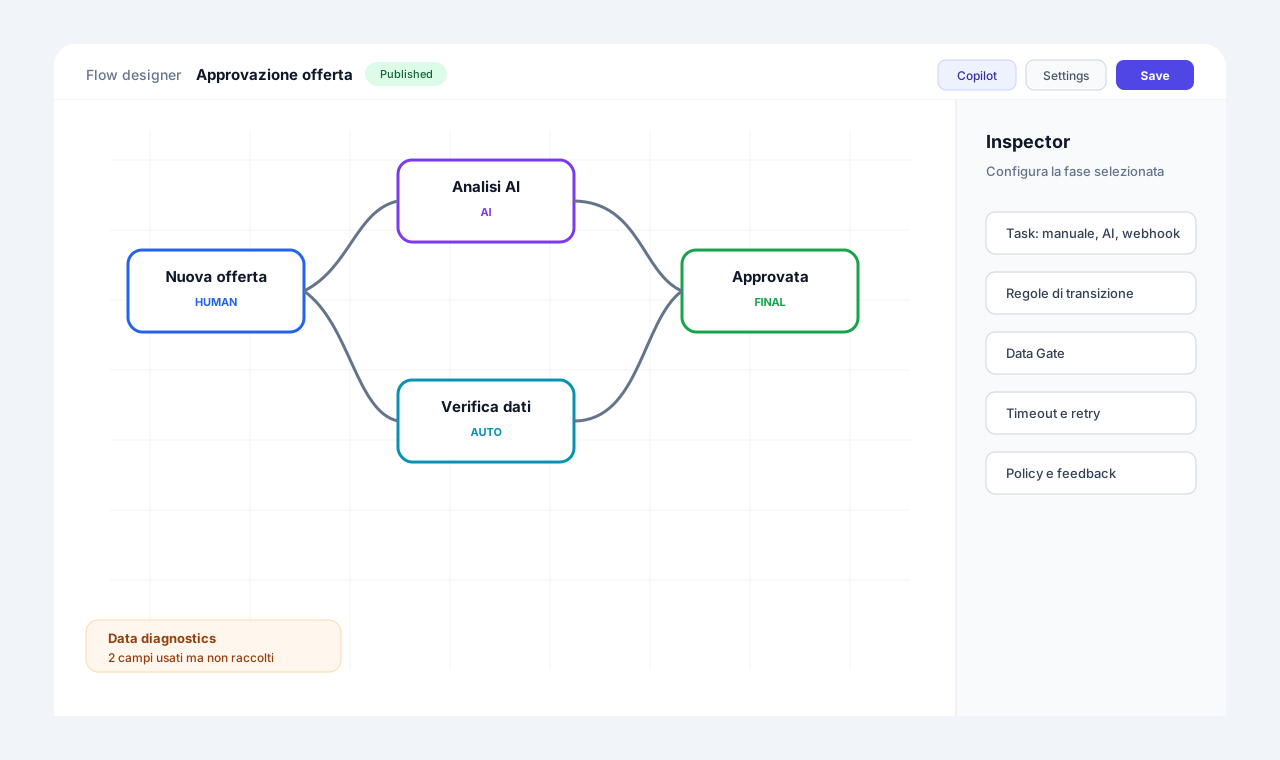
The Flow Designer is where a process stops being a drawing and becomes an executable object. Stages, rules, timings, data and roles live in the same model, and what you publish is what runs. There is no translation between the analyst's diagram and the IT configuration: there is one artifact, readable by whoever runs the process and verifiable by whoever audits it.
Three problems this area solves
The drawing does not match what runs
The diagram lives in one tool and the logic elsewhere: after six months nobody knows which one is true.
Work piles up and nobody sees it
Without work-in-progress limits and maximum times, queues grow silently until someone complains.
Every change is a risk
Changing a live process risks breaking cases already started or overwriting a colleague's work.
Create with AI: structure first, detail second
Describe the process in words: the AI draws stages and arrows first, then tasks, assignees and timings.
Generation happens in two passes. The skeleton comes first, meaning stages and links; then tasks, assignees and timings are added without changing the names and links already decided.
Technical details
- The skeleton is saved immediately.
- If a step fails, only that step is retried and the draft is not lost.
- Designer copilot: edit the draft in natural language, with limit checks and automatic correction before saving.
- AI generation of the data schema and forms.
Explainable transition rules
Nestable conditions with a default rule: and when a rule does not fire, the history says why.
Conditions combine as all, at least one or not, and are also evaluated when an event arrives. When a rule does not fire, the history records the reason: you always know why a case did not move on.
Technical details
- Rules wait for the stage tasks to be created; concurrent evaluations are deferred, not lost.
- Automatic recovery after a failure.
Data Gate
The Data Gate asks for better data: it does not automate badly.
If essential data is missing, the case enters the stage but stays "waiting for data" with its tasks suspended. It restarts by itself when the data arrives from a form, a task, an integration or an API. This keeps AI from working on empty data.
Explore this feature in detailWIP limits and capacity queues
Work-in-progress limits per flow and per stage, with four possible reactions.
You set how many cases can sit in a stage, as a number or as an expression on a variable. Beyond the limit the system reacts as you decided, instead of letting work pile up unseen.
Technical details
- 4 reactions: warning only, parking with manual override, strict parking, diversion to another stage (overflow/escalation).
- Release from the queue by priority or arrival order.
- "Force entry" for Admins only, with a tracked reason.
- Events arriving during the queue are set aside and replayed in order (up to 20).
Outcomes, score and ideal path
Business outcomes on final stages and an ideal path that shows where cases deviate.
Final stages carry a positive, negative or neutral outcome. A per-stage score can drive the rules. The ideal path is highlighted in the designer and the Monitor flags cases that deviate and the exact point of deviation.
Living data contract and flow KPIs
Declared fields and fields observed in real use, with type and provenance, plus flow KPIs.
Declared fields and those observed in real use (forms, APIs, AI, automations) appear with type and provenance. You promote them into the contract or ignore them.
Technical details
- Strict mode that rejects values of an incompatible type on every channel.
- A "Sensitive" flag per field, which feeds Data Shield and masking.
- Per-case metrics and aggregate KPIs: count, sum, average, min, max, standard deviation, formulas.
- OK/warning/critical thresholds and targets.
Immutable versions and controlled publishing
One draft per version family; published versions are immutable snapshots.
Cases already started stay on the version they were born with, so changing the process does not alter work in progress. Before publishing, the system runs consistency checks.
Technical details
- Pre-publish checks: at least one reachable final stage, no non-final "trap", timeouts with a destination, safe scripts.
- Navigable warnings ("Go to stage").
- Diagnostics of published flows with an automatic hourly repair.
- Safe saving in co-design: no silent overwrites.
The features
Visual flow designer
A canvas where stages are nodes and transitions are links, with all the detail in the side panel.
Show detailsHide details
You draw the process as you live it: every stage is a node, every handoff an arrow. The side panel gathers tasks, rules, data, AI and timeouts for the selected stage, so you never jump between screens.
Technical details
- Three ways to create a flow: from scratch, with AI, or from an import (file, pasted JSON or URL).
- Duplication of stages and tasks together with their rules and events.
- Guided {x} picker to insert variables, fields and documents.
- Custom entity names (e.g. "order/orders"), so the interface says "+ Create order".
Seven task types
One stage can mix different tasks: manual, integration, AI, wait, sub-flow, script and event.
Show detailsHide details
The task type says how the work gets done. People and automations live in the same model and share the case data.
Technical details
- Available types: Manual, Integration (webhook/n8n), AI, Wait, Sub-flow, Script, Event.
- Blocking or background tasks.
- Sequential execution with data shared between tasks.
- Configurable automatic retry (attempts and delay).
- Configuration errors are not pointlessly retried.
Nested sub-flows
A task starts a child flow and completes when the child finishes.
Show detailsHide details
Break large processes into small reusable flows. The parent waits, the child works, and data handover is always explicit.
Technical details
- Data passed by explicit mapping or inheritance with confirmation: no implicit copying.
- Up to 5 levels of nesting.
- A flow that starts itself unconditionally cannot be published.
Safe scripts
Sandboxed JavaScript with dedicated functions, designed to leave no room for injection.
Show detailsHide details
When a rule is not enough, a script covers the case. It runs in a sandbox and talks to the case only through dedicated functions: setData, setOutcome, notify, raiseEvent, assign, email and more.
Technical details
- Values entered by operators, APIs or agents become literals: no injection.
- Emails restricted to tenant users: 5 per case, 100 per hour per tenant.
- Security lint at publish time.
Timeouts, SLA and exception routes
Readable durations, a destination on expiry, and exception stages reachable only by the system.
Show detailsHide details
Every stage can have a maximum time and a precise destination for when it expires. SLAs can either just warn or trigger an automatic escalation.
Technical details
- Readable durations (30s, 2h, 1d, 1w, 1h30m, ISO date or expression), up to 366 days.
- "On expiry go to" a specific stage.
- Maximum iterations per stage.
- Exception stages (Escalation, Expired, Out of capacity) reachable only by the system.
- SLA with warning only or with automatic escalation.
- Every case records its status reason: rule, event, timeout, iterations, WIP diversion.
Global and flow variables, including secrets
Thresholds and SLAs change in one place only; secrets stay encrypted and masked.
Show detailsHide details
Thresholds and SLAs live in variables, so they change in one place instead of in dozens of rules.
Technical details
- The secret type is encrypted and masked; only the Admin can reveal it, with an audit trail.
- The decision history records the value and the version of the variable used.
Flexible flow activation
Manual start, from API, from an event, from an AI agent, or scheduled for a future date.
Show detailsHide details
You decide who and what can start a flow. Manual start can be restricted by role.
Technical details
- Multiple activation, one at a time, or only once per entity.
Case title from a formula or AI
A title composed from case data, tested on a real case before saving.
Show detailsHide details
The case title is composed from its data, up to 500 characters, so the list reads at a glance. The Try button shows the result on a real case.
Technical details
- Alternatively, a title generated by AI only once and only when the data is complete.
Deep dive
From draft to production without surprises
The designer works on one draft per version family. When you publish, the system runs consistency checks: at least one reachable final stage, no non-final stage without an exit, timeouts with a destination, scripts that pass the security lint. Warnings are navigable: one click and you are on the stage to fix. The published version becomes an immutable snapshot.
Cases already started stay on the version they were born with. This means you can improve the process every day without touching work in progress, and that every case history tells the rules that applied then, not today's. Inside every stage tasks of seven types coexist, from manual entry to an AI call, and all of them share the same data.
Governance is inside the model, not around it. The Data Gate holds the case until essential data arrives, WIP limits react when a stage saturates, SLAs warn or trigger an escalation. When a rule does not fire, the history says why. So the designer produces not only flows that work, but flows that can be explained to someone who did not draw them.
Related use cases
Related areas
Frequently asked questions
Can I create a flow from a description in words?
Yes, from the Automate edition: the AI draws the structure first and the detail after, and you can correct the draft in natural language. Alternatively start from scratch or from an import.
What happens to running cases when I publish a new version?
They stay on the version they were born with. New cases use the new version.
How do I stop work piling up in one stage?
With WIP limits: four policies, from a warning to diversion to another stage, plus timeouts with a destination.
How many task types are there?
Seven: Manual, Integration, AI, Wait, Sub-flow, Script and Event.