
Feature area
Connect systems, govern the work
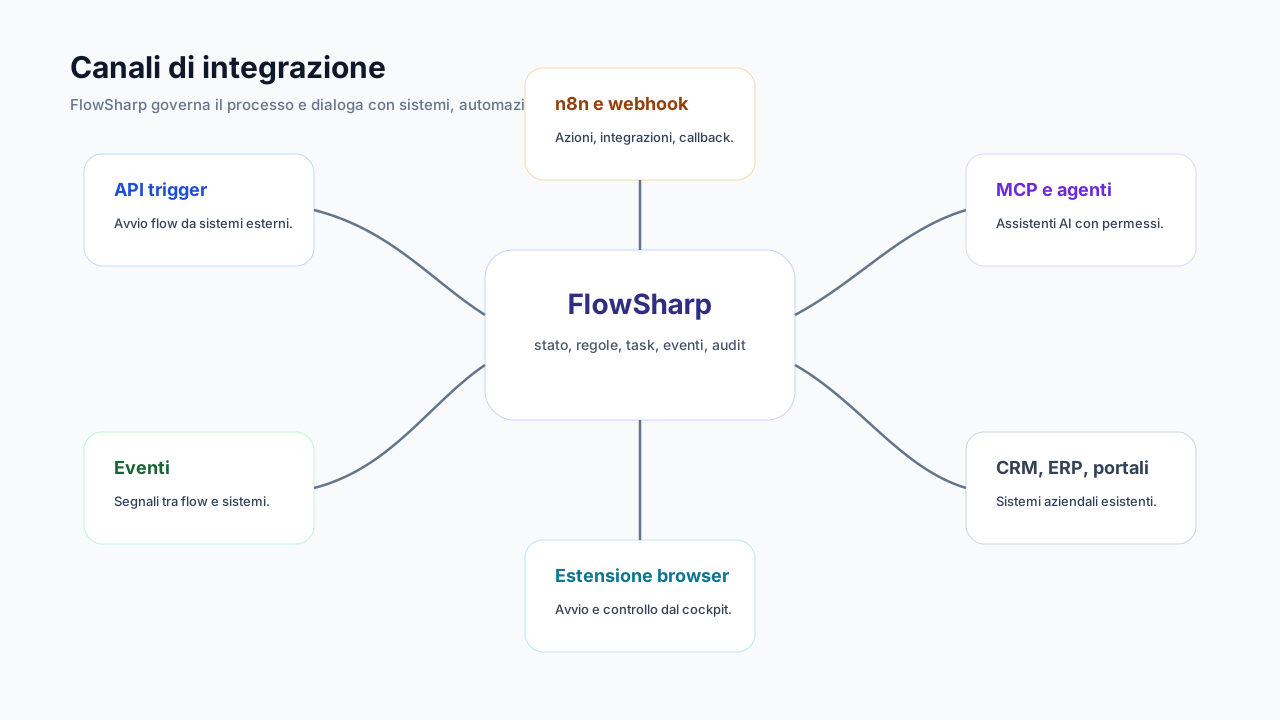
Real processes cross different systems: CRMs, ERPs, portals, on-premise ERPs. FlowSharp connects them without becoming another integration tool to govern: technical execution can live in n8n or a connector, while state, tasks, timing and audit stay in the case. Integrations are signed, limited and observable, and a failed delivery is never mistaken for a success.
Three problems this area solves
Fragile, silent integrations
A lost webhook or an error mistaken for success and the case stays stuck with nobody knowing.
Scattered secrets
URLs and credentials copied across dozens of scripts, impossible to rotate or audit.
The process does not know what automation does
External execution and the work flow live apart, with two incompatible histories.
Signed inbound webhooks
One URL and one secret for every external system that cannot use an API key.
Every source has its own URL and secret. When the secret is regenerated, the old one stops working immediately.
Technical details
- HMAC-SHA256 signature with anti-replay protection (5-minute tolerance).
- Body up to 256 KB; limits per webhook and per organization.
- Receipt history without the content.
- Regeneration that immediately invalidates the old secret.
Events between processes
An event starts a flow, unblocks or updates a case, or notifies external systems.
Events connect processes to each other. System events fire by themselves on timeout, WIP, SLA, completed or failed tasks and KPI thresholds.
Technical details
- Correlation by entity reference.
- Optional payload schema.
- Recoverable dead letters.
- Delivery analytics with 8 indicators.
Orchestration with n8n
n8n runs the technical integrations; FlowSharp governs state, tasks and audit.
Automation executes, FlowSharp governs the work. The case context travels automatically to the workflow.
Technical details
- Guided workflow import with preview and resync with difference detection.
- Guided test in test or production mode.
- One-click workflow opening.
- Ready, already-authenticated snippets (complete task, update data, raise event, transition).
- Support for self-hosted n8n in the same stack.
Browser extension
A side panel that reads the context of web portals and CRMs and links cases without copy-paste.
You start or consult cases while working in the portal or CRM, and link them to external entities.
Technical details
- The connection renews itself.
- Immediate revocation.
- "Open in FlowSharp" with a single-use token.
- Two-step verification inherited.
- Bilingual.
The features
API start (Trigger)
E-commerce, CRM, ERP or portals start a case with one call and an API key.
Show detailsHide details
The external system calls FlowSharp and the case starts. The same event never creates duplicates.
Technical details
- Idempotency and per-entity deduplication.
- Validation against the data schema.
- Rate limit.
- Keys with expiry (90 days preset, 365 at most), scope and flow whitelist.
Verifiable outbound webhooks
When an event happens, FlowSharp notifies connected systems, with a per-attempt history.
Show detailsHide details
Calls are signed by default and you can send a test before enabling them. Statuses are honest: partial delivery, failed, unverified.
Technical details
- Delivery history per attempt, up to 3 automatic retries.
- Public destinations only.
Reusable connectors and Integration tasks
Centralized URLs and secrets with testing, rotation and a draft, validated, deprecated lifecycle.
Show detailsHide details
The JSON body is escaped automatically, so an odd value cannot break the payload. The response merges into the data with an "all or nothing" rule.
Technical details
- Blocking of private addresses and cloud metadata.
- Timeouts from 5 to 1,800 seconds.
Asynchronous callbacks
For long automations, the external system calls FlowSharp back when finished.
Show detailsHide details
Designed for long-running external processing and ERP batches. An error is never mistaken for a success.
Technical details
- Stale callbacks are rejected.
- Completion by task code.
Process email
SMTP or email provider via API, with multiple providers in priority and reserve.
Show detailsHide details
Templates use the organization's colors and you can run a real send test.
Technical details
- Credentials encrypted and not readable back.
On-premise legacy integration
A Windows ERP starts cases with its own key; FlowSharp calls it back through connectors.
Show detailsHide details
n8n bridges to the database, all inside the same Docker stack.
Deep dive
Connected systems, state in one place
Inbound, an external system starts a case with an API call and a key, with idempotency, per-entity deduplication and validation against the data schema. Whoever cannot use a key has the inbound webhook: one URL and one secret per source, HMAC-SHA256 signature, anti-replay protection with a 5-minute tolerance, body up to 256 KB and regeneration that immediately invalidates the old secret.
Between processes and towards the outside, events act as glue: they start a flow, unblock or update a case, notify external systems. System events fire by themselves on timeout, WIP, SLA and KPI thresholds, and dead letters are recoverable. Outbound webhooks are signed and declare honest statuses, such as partial delivery, failed or unverified, with per-attempt history.
With n8n, technical automation executes and FlowSharp governs. The case context travels to the workflow, which is imported with preview and resynced by detecting differences; snippets are already authenticated. Reusable connectors centralize URLs and secrets with testing and rotation, block private addresses and cloud metadata, and support async callbacks for long-running external processing and ERP batches. The browser extension brings cases into web portals and CRMs.
Related use cases
Related areas
Frequently asked questions
Can I start a case from an external system?
Yes, with an authenticated API call or a signed inbound webhook. Availability does not depend on the edition.
How do I verify a webhook comes from the right sender?
With the HMAC-SHA256 signature and the 5-minute anti-replay window.
Do I need n8n to integrate?
No. n8n is a choice for complex integrations, available from Automate; API, webhooks and events are enough for many cases.
Can an on-premise ERP be integrated?
Yes, the ERP starts cases with its own key and FlowSharp calls it back through connectors or n8n.