
n8n moves the data. FlowSharp governs the work.
Keep your n8n workflows and put them inside a process with states, owners, exceptions and audit.
- For
- IT
- Partner
The problem
n8n workflows are excellent at moving data between systems, but they do not tell the business where the process stands: who must approve, what is stuck, what failed and why. With dozens of isolated workflows, business logic ends up scattered across technical nodes only their authors understand. When something breaks, whoever runs the process has no single view: they must ask whoever maintains n8n, and whoever maintains n8n does not know which case is involved. You need two layers with distinct responsibilities: a technical one that executes operations, and a process one that knows who decides, what is blocked and what happened, readable by people who do not program.
State · FlowSharp
Workflow · n8n
How it works
- 1
Import the workflow
You paste the webhook URL, the editor URL or the workflow JSON and FlowSharp creates a connector with a preview. The existing n8n workflow does not have to be rewritten.
- 2
Use it in an Integration task
The case context travels automatically in the body of the call (case, task, execution identifier, callback URL). n8n therefore always knows which work it is operating on.
- 3
n8n works and calls back
For long automations n8n closes the task with a callback. With the ready snippets it can also update data, raise events or advance the case.
- 4
Keep everything aligned
Resync reports the differences, the guided test works in test or production mode and one click opens the workflow in the editor.
Specifications
| Import | from webhook URL, editor URL or JSON, with preview |
|---|---|
| Context sent | case, instance, task code, execution identifier, callback URL |
| Ready snippets | complete task (also by code), update data, raise event, transition, read case |
| Callbacks | authenticated, with rejection of stale callbacks; an error never becomes a success |
| Testing | editable payload, test/production switch |
| Deployment | self-hosted n8n supported in the same Docker stack |
| Exceptions | configurable retries and human fallback on the Integration task |
An operational example: creating a customer in the ERP
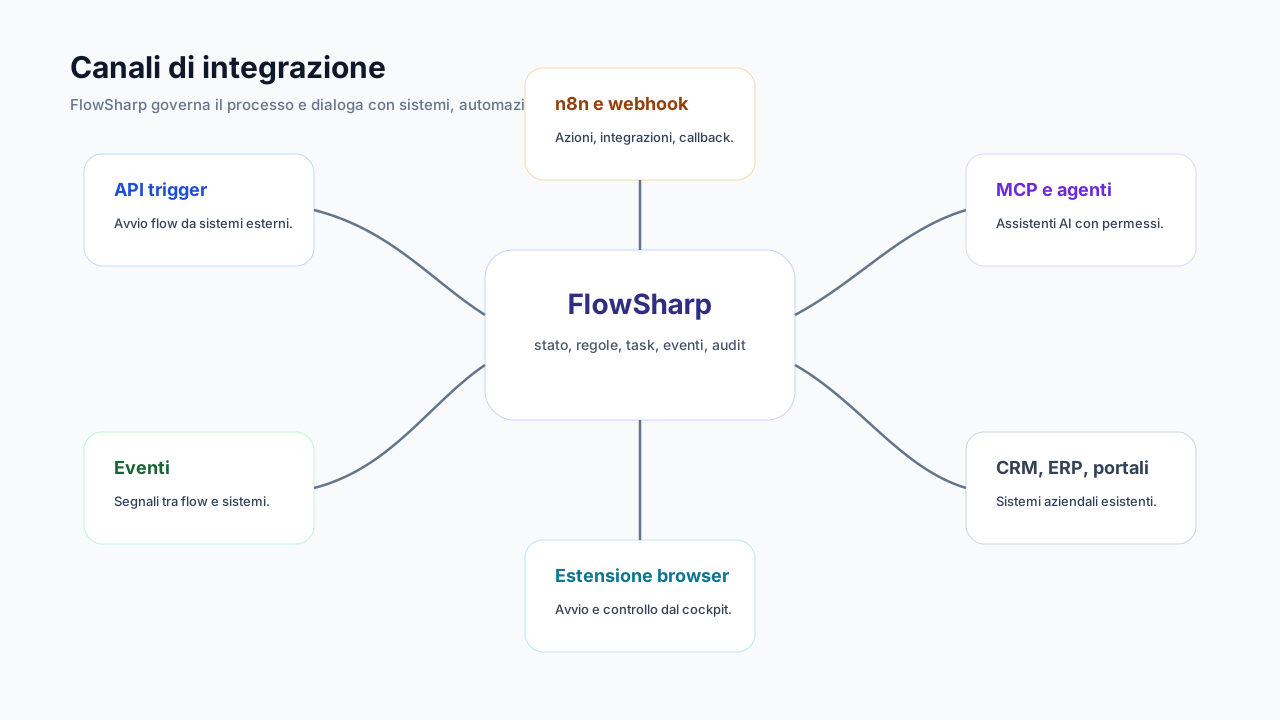
In the FlowSharp flow there is an Integration task called Create customer in ERP, placed among the stages and people that govern the process. When the case reaches that task, FlowSharp calls the webhook of an n8n workflow and includes the context in the body of the call: case, instance, task code, execution identifier and callback URL. The n8n workflow does the technical work: it receives the call from the webhook, creates the customer in the ERP and responds. Then it calls FlowSharp back with the callback, marking the task as done. The case can then proceed. The separation is clear: state, owners and exceptions live in FlowSharp, while n8n runs the technical operations. The diagram beside it shows the round-trip loop between process state and workflow, in illustrative form and not as an official screenshot.
How to verify the integration
To check that the integration is healthy, start with the guided test: you can edit the payload and choose whether to run it in test or production mode, so you can try the connection without touching a real case. Then use resync, which reports differences between the connector and the n8n workflow, and the link that opens the workflow in the editor. On the data side, callbacks are authenticated and stale ones are rejected, and an error is never recorded as a success, so a task's state is reliable. In case of failure the configured retries apply and, where set up, human fallback on the Integration task. For governance, connector secrets are encrypted and have a lifecycle, and every execution is correlated with the case: in the history you can see which call went out, when and with what outcome.
Related features
- Reusable connectors and Integration tasksCentralized URLs and secrets with testing, rotation and a draft, validated, deprecated lifecycle.
- Asynchronous callbacksFor long automations, the external system calls FlowSharp back when finished.
- Events between processesAn event starts a flow, unblocks or updates a case, or notifies external systems.
- Human fallback in the same taskIf automation is uncertain or fails, the same task passes to a person: no extra task.
- On-premise legacy integrationA Windows ERP starts cases with its own key; FlowSharp calls it back through connectors.
Use cases
Frequently asked questions
Do I have to use n8n?
No: FlowSharp has APIs, webhooks, events and connectors to any HTTP service. n8n is the most complete native integration.
Can I use my own self-hosted n8n?
Yes, including in the same Docker stack as the on-premises installation.
What happens if the n8n workflow fails?
The task follows the configured retries and, where set up, passes to a person through human fallback.
Does business logic stay in n8n?
Process logic (states, rules, owners) lives in FlowSharp; n8n runs the technical operations.