
Feature area
AI in processes, with governance
AI is useful in processes only if it can be governed. FlowSharp treats it as a participant in the flow, with rules: Data Shield replaces reserved fields with placeholders before every call, the decision ladder sets who decides when the model is uncertain, the call log records costs and attributions. The result is an AI you can explain to a compliance officer, not just to a technical team.
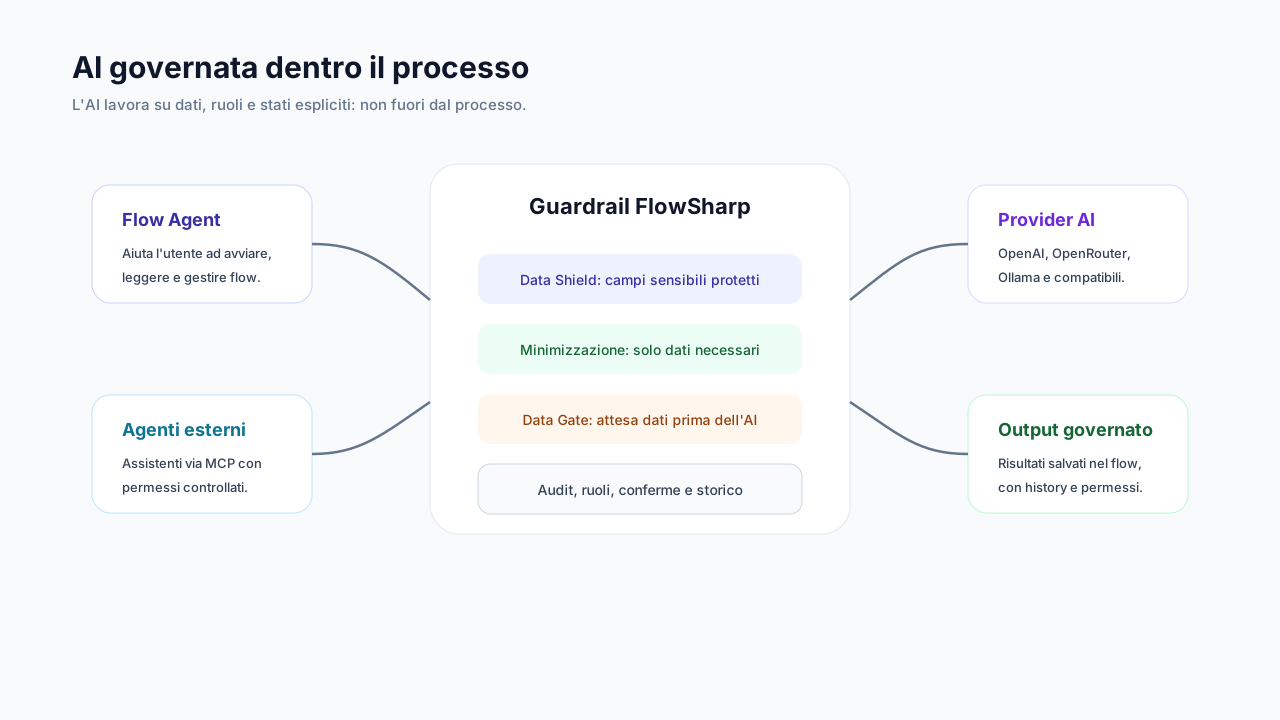
Reserved fields are replaced with placeholders before every AI call, on every channel. If shielding is not available, the call does not start.
Three problems this area solves
Sensitive data towards external models
One badly written prompt is enough to send names, amounts or personal data to an external service.
AI decisions without a human final word
When the model is confidently wrong, nobody steps in because nobody was planned.
Invisible costs and accountability
Without a log you do not know who spent what, with which model and on which case.
Decision ladder: Person, fast AI, generative AI
A fast model decides when sure, an LLM restarts from scratch otherwise, and finally a person decides.
System One is a fast, inexpensive decision model that answers typed questions with a probability. If it is uncertain, System Two (an LLM) restarts from the original data without seeing the first answer, to avoid anchoring. If System Two is also uncertain, a person decides. Every decision is tagged system1, system2 or human.
Technical details
- Up to 20 questions per task, of three types: yes/no, classification, score.
- Confidence thresholds; below the threshold the value is not written.
- A Try button on a real case without writing data.
- Reusable presets and assistants prepared by the Admin.
- Catalog of 4 ready-made models: CV evaluation, lead scoring, request triage, document check.
Data Shield
0 sensitive data exposed: reserved fields become placeholders before every AI call.
Fields classified as reserved are replaced with placeholders before every AI call and on every channel: tasks, decisions, Flow Agent, design, titles, summaries. If shielding is not available, the call does not start.
Technical details
- The real value comes back only into a field that is itself reserved.
- If shielding is unavailable, the call does not start.
- Classification applies to the whole version family and propagates to child cases.
- The assignee is protected by default.
- Additional anonymization of free text.
Reserved fields are replaced with placeholders before every AI call, on every channel. If shielding is not available, the call does not start.
AI call log
Three logging levels per provider and spend attribution to user, key or Flow Agent.
The levels per provider are off, metadata only and full. With shielding active the pseudonyms appear, never real values. The log is not reachable by agents or templates.
Technical details
- Cost estimated from the model price list.
- Spend attribution to user, MCP key, API key or Flow Agent.
- Filters by provider, channel, outcome, case and ladder step.
- CSV/JSON export up to 10,000 rows, tracked.
- Retention from 1 to 3,650 days.
Decision metrics
Automatic versus human decisions, fallback rate, escalation rate and system1/system2 split, usable as KPIs.
You measure per flow and per task how much automation decides and how much people do. AI cost adds each ladder step at its model's price list.
Documents as AI context, with consent
A document's text reaches the AI only if that document is marked "agent context".
Otherwise the model receives an explicit [document unavailable], never an empty text, so nobody mistakes an absence for an empty document.
The features
Generative AI tasks
System and user prompts, with output to a field or as an outcome.
Show detailsHide details
The AI task writes the result into a field or uses it as the stage outcome. Assistants are configured for specific purposes.
Technical details
- Decisions can also be made on Library documents.
- A missing provider never falls back silently: the task fails with the cause in the history.
Data minimization
The model receives only the fields in the data schema, with warnings when a prompt strays outside the perimeter.
Show detailsHide details
The perimeter is the data schema: whatever is not part of it never reaches the model.
AI execution transparency
In the task detail: model, tokens, duration, shielded values and the question, answer, confidence, field table.
Show detailsHide details
Whoever reviews an AI task sees what happened without digging through logs: model used, tokens, duration and how many values were shielded.
Choice of AI providers
Managed AI included in the plan; with Automate you pick your own providers, including local models.
Show detailsHide details
From Optimize you use the managed AI included in the plan. From Automate you can connect your own providers with your own keys: OpenAI, OpenRouter, local Ollama and compatible providers.
Own providers with your own keys from Automate.
Technical details
- Provider per task or organization default (own providers, from Automate).
- Encrypted credentials.
Deep dive
Three levels to decide, one shield to protect
The decision ladder gives AI a precise role. System One is a fast, inexpensive model that answers typed questions, yes or no, classification or score, with a probability. If it is uncertain, System Two, an LLM, restarts from the original data without seeing the first answer, to avoid anchoring. If System Two is also uncertain, a person decides. Every decision is tagged system1, system2 or human and feeds measurable indicators such as fallback and escalation rate.
Data Shield protects the perimeter. Fields you mark as sensitive in the data contract become placeholders before every AI call, on every channel: tasks, decisions, Flow Agent, design, titles and summaries. The real value comes back only into a field that is itself reserved. If shielding is not available, the call does not start. Minimization completes the picture: the model receives only the fields in the data schema.
The AI call log has three levels per provider: off, metadata only and full. With shielding active, pseudonyms appear, never real values. Cost is estimated from the model price list and attributed to a user, key or Flow Agent; export reaches 10,000 rows and retention runs from 1 to 3,650 days. Documents and extracted text reach the AI only with explicit agent-context consent.
Related use cases
Related areas
- Human-in-the-loopAutomation proposes, a person decides when needed: fallback, confirmations and alerts.
- AI agents and MCPConnect AI assistants to the process with permissions, attribution and human confirmation.
- Security and complianceImmutable audit, roles, retention and legal hold: tools in support of compliance.
Frequently asked questions
What does 0 sensitive data exposed mean?
Reserved fields are replaced with placeholders before every AI call, on every channel. If shielding is not available, the call does not start.
Is Data Shield included in the Free plan?
The feature is included, but the Free plan has no AI calls: it takes effect when AI is active.
Can I use my own AI providers?
From Automate yes, with your own keys, including local models. Up to Optimize the plan's managed AI is used.
Does the call log show real data?
With shielding active it shows pseudonyms. The log is not reachable by agents or templates.
Who decides when the AI is uncertain?
First an independent second level, then a person: the decision ladder sets it in the flow.