
0 sensitive data exposed to AI.
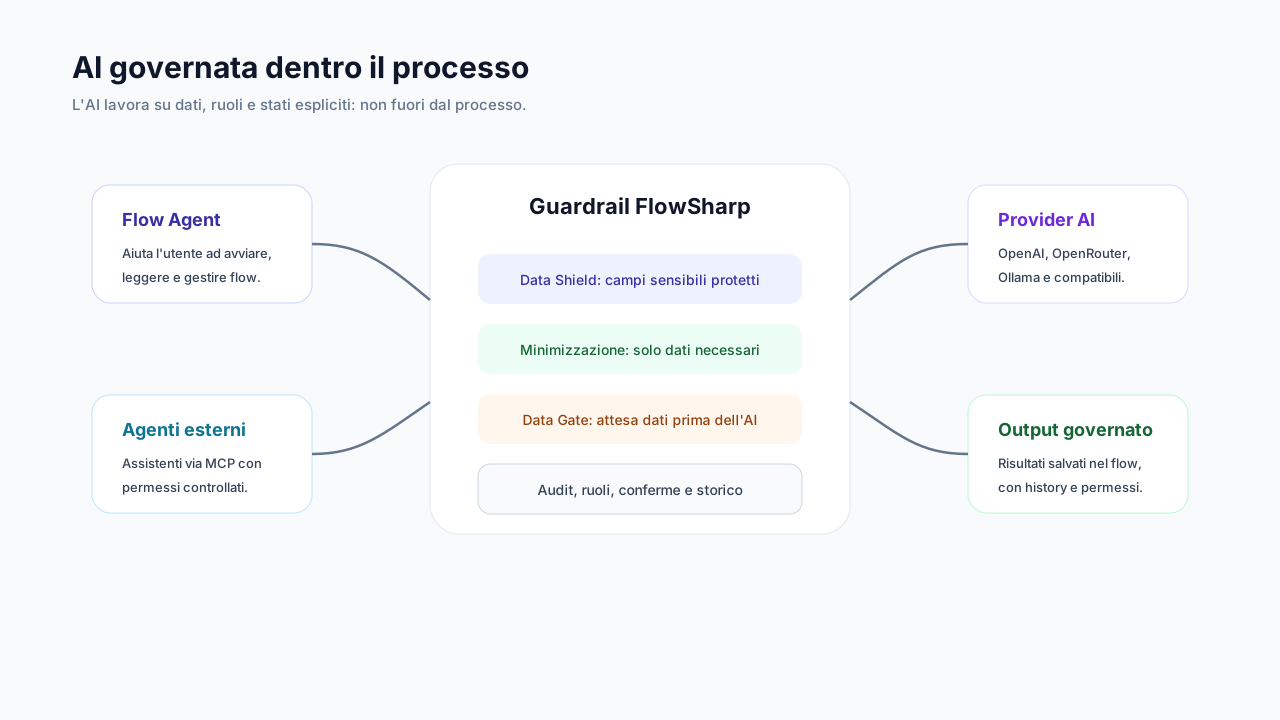
Reserved fields are replaced with placeholders before every AI call, on every channel. If shielding is not available, the call does not start.
Included with AI, from Optimize. The "0" applies to the fields your organization has classified as reserved in the data schema: it is not an unconditional promise.
- For
- Compliance
- IT
The problem
The first obstacle to adopting AI in processes is the fear of sending personal, financial or confidential data to an external provider. Company policies say "don't", but data still flows through prompts, integrations and assistants, often without anyone noticing. A written policy prevents nothing by itself: you need a mechanism that acts before the call, uniformly, on every channel and without depending on the goodwill of whoever writes the prompt. For a data protection officer, moreover, it is not enough that protection exists: it must be demonstrable. Data Shield moves control from people's behavior to system configuration, and makes it verifiable.
Case
Message to the AI
How it works
- 1
You classify the fields
In the data schema you mark sensitive fields as reserved: tax code, IBAN, amounts, internal notes, even the case title. The assignee is protected by default. Protection starts from this classification: what is not marked as reserved is not shielded.
- 2
Before every call, the shield
Data Shield replaces values with placeholders on every AI channel: AI tasks, fast decisions, LLM, Flow Agent, design, titles and summaries. It also applies to numbers, booleans and short values. The model works on the placeholder, never on the real value.
- 3
The value returns only where it should
If the AI's output must contain the real value, it is restored only into a field that is itself reserved. Protected data never flows back into free fields where it could spread.
- 4
Fail-closed
If shielding is not available, the AI call does not start. When in doubt the system stops: there is no fallback path that sends the data in clear anyway.
Specifications
| Channels covered | AI tasks, System One/Two, Flow Agent, Copilot and generation, titles, summaries |
|---|---|
| Scope | the whole family of flow versions, propagated to child cases |
| Free text | additional provider anonymization (cannot disable field protection) |
| Documents | with Data Shield on, document text becomes an explicit placeholder |
| Minimization | the model receives only the data-schema fields, with warnings if a prompt goes outside the perimeter |
| History | redacted in the database too; rotatable encryption keys |
| Warnings | warning (not a block) if webhooks, events or scripts touch reserved fields |
An operational example: from field to placeholder
A case contains three fields the organization has classified as reserved in the data schema: a tax code, an IBAN and an amount. In the case they are marked with a lock. When an AI function must use the case, before the call Data Shield replaces the three values with placeholders, for example [RESERVED_FIELD_1], [RESERVED_FIELD_2] and [RESERVED_FIELD_3]. The message that goes to the model contains only the placeholders and the non-reserved context, and the shield indicates that three values were shielded. It is the classification that decides what is protected: data nobody marked as reserved is not shielded, which is why the claim of zero sensitive data exposed must be read together with the classification of fields. The diagram beside it is illustrative and not an official screenshot.
How to verify that protection is effective
The first check is on classification: review the data schema and check that every field you consider reserved is actually marked as such. It is a check to repeat when fields are added. The second check is in the AI call log: each row indicates the shield was active and how many values were shielded, so you can compare the expected number with the real one. The third is behavior in case of trouble: if shielding is unavailable the call does not start, so a failure does not turn into silent exposure. For governance this means being able to answer a DPO with evidence: which fields are classified, that every call was shielded and that reserved text is not kept in the history, where only placeholders and provenance remain. The claim therefore stays conditional and verifiable, not a generic promise.
Related features
- Data minimizationThe model receives only the fields in the data schema, with warnings when a prompt strays outside the perimeter.
- AI call logThree logging levels per provider and spend attribution to user, key or Flow Agent.
- Living data contract and flow KPIsDeclared fields and fields observed in real use, with type and provenance, plus flow KPIs.
- Documents as AI context, with consentA document's text reaches the AI only if that document is marked "agent context".
- Decision ladder: Person, fast AI, generative AIA fast model decides when sure, an LLM restarts from scratch otherwise, and finally a person decides.
- Built-in Flow AgentA conversational assistant always at hand (⌘/Ctrl+J), always within the user's permissions.
Use cases
Frequently asked questions
Does it work with any AI provider?
Yes: shielding happens in FlowSharp before the call, whatever the provider (local models included).
What if the AI needs to use that data?
It receives the placeholder; if the output must contain it, the real value is put back only into a reserved field.
How do I demonstrate it to a DPO?
With the AI call log, which shows for each call the shielding applied and records only pseudonyms.
Does it also protect webhooks and integrations?
There the data passes by design choice, but the designer warns when an integration touches a reserved field.