
Feature area
Security and governance you can demonstrate
The security of a process platform shows in the details: the history that cannot be rewritten, roles that can only restrict, two-step verification for administrators, retention the organization decides. FlowSharp is designed to support organizations with regulatory requirements, with concrete functions and honest language: it provides supporting tools, compliance remains the organization's responsibility.
Three problems this area solves
Histories that can be edited
An audit that can be rewritten is not an audit, and the reader knows it.
Permissions too broad
Generic roles give access to more processes than needed, including AI agents.
Data kept without a rule
Without retention and legal hold, you keep too much or delete what was needed.
Immutable history and atomic audit
Case history is write-once, protected at database level.
Critical operations succeed only if the audit is recorded; otherwise they are rolled back in the same transaction. Flow lifecycle is tracked with the exact revision that went to production.
Explore this feature in detailLegal hold
Blocks retention, deletion and purge of documents of cases or flow versions, with a mandatory reason.
A hold on the flow also protects its cases.
The features
Activity log
Who, when, through which channel and on what, including logins, failed attempts and two-step verification.
Show detailsHide details
The channels are interface, AI agent, engine and platform.
Technical details
- CSV/JSON export up to 50,000 rows.
- Retention from 30 days to 10 years per organization.
Roles, folder permissions and custom roles
Four roles, folder permissions that can only restrict, and custom roles for who starts flows.
Show detailsHide details
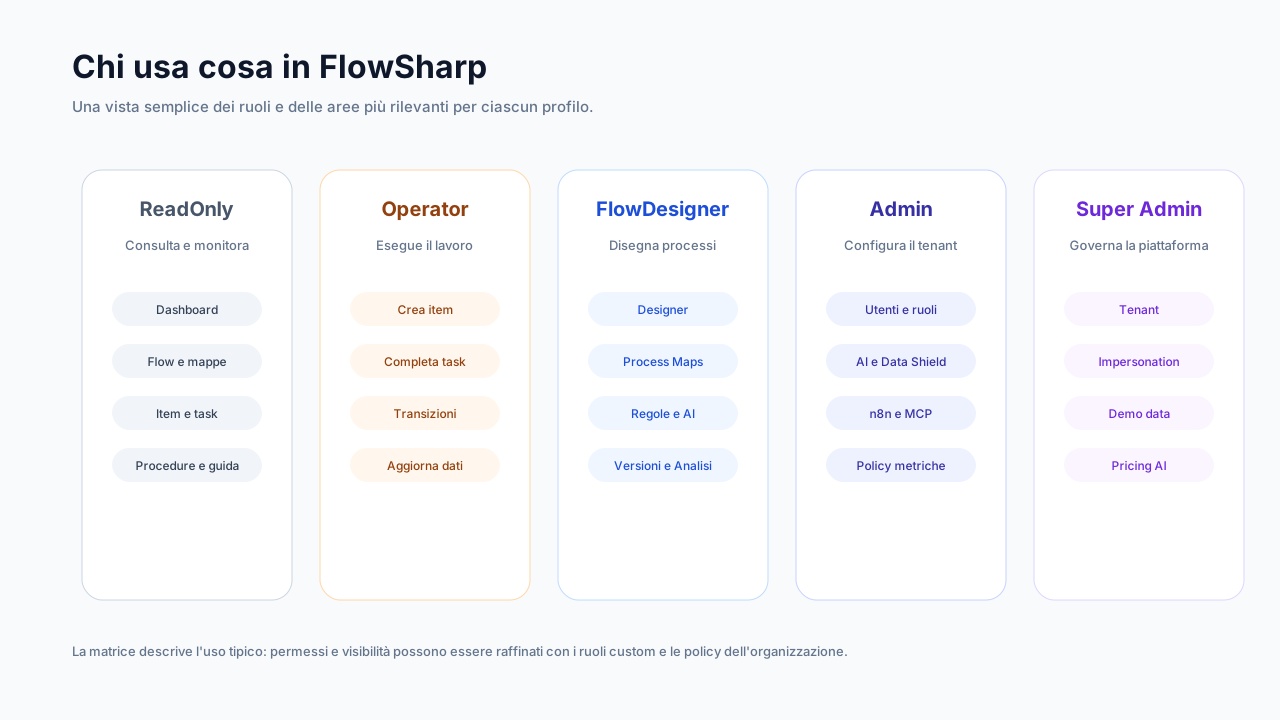
The roles are Admin, FlowDesigner, Operator and ReadOnly. Read, write and manage permissions per flow folder, included from Optimize, can only restrict a role.
Folder permissions from Optimize.
Technical details
- Custom roles to select who starts certain flows.
- Sensitive fields masked for read-only users.
Two-step verification and sessions
Mandatory for administrators, with 10 single-use recovery codes and per-device sessions.
Show detailsHide details
After 10 failed attempts in 15 minutes access is locked. Each session can be revoked individually.
Technical details
- Password history and a session duration cap.
Configurable retention
Distinct retention for completed cases, audit, AI call log and webhook receipts.
Show detailsHide details
Completed cases have retention per flow; audit from 30 to 3,650 days.
Transparent support impersonation
Support actions appear as "FlowSharp Support", with duration limits.
Show detailsHide details
During impersonation no credentials can be created.
Multi-organization and federation
Workspace switcher and federated access to another installation, instantly revocable.
Show detailsHide details
The hosting organization can revoke access at any time. The verified identity must match the invited one.
White label
Organization logo, colors and default language also on emails, notifications and AI summaries.
Show detailsHide details
The client's or firm's brand appears wherever the end user reads something from FlowSharp.
Multi-tenant for partners
Organizations isolated at query level, with quotas and features enabled per organization.
Show detailsHide details
A partner manages several clients from a single installation, each isolated from the others.
Enterprise Single Sign-On
Sign-in with the corporate identity provider (SAML / OpenID Connect).
EU SaaS or on-premise, even air-gapped
The same product in the EU cloud or in Docker on your infrastructure, with a signed offline license.
Show detailsHide details
The signed offline license is for environments without Internet. License synchronization never sends case content. Details are on the Deployment page.
| Requirement | Functions that help demonstrate it | Reference |
|---|---|---|
| Decision traceability | GDPR, AI Act, ISO 27001 | |
| Data minimization toward AI | GDPR, AI Act | |
| Human oversight | AI Act | |
| Access control | ISO 27001, GDPR | |
| Retention and deletion | GDPR |
FlowSharp provides tools in support of compliance; compliance remains the organization's responsibility.
Deep dive
From requirement to function
Case history is write-once and protected at database level. Critical operations succeed only if the audit is recorded, otherwise they are rolled back in the same transaction. The activity log says who, when, through which channel and on what, including logins, failed attempts and two-step verification, with export up to 50,000 rows and retention from 30 days to 10 years.
The four roles, Admin, FlowDesigner, Operator and ReadOnly, are joined by folder permissions, from Optimize, which can only restrict, and by custom roles for who starts flows. Two-step verification is mandatory for administrators, with 10 recovery codes and per-device sessions. FlowSharp support always appears as such in the history and cannot create credentials.
For data retention, retention is distinct for completed cases, audit, AI call log and webhook receipts. Legal hold, in Enterprise, blocks retention, deletion and purge with a mandatory reason. Federation, white label and multi-tenant support partners and groups, with instantly revocable access. Enterprise Single Sign-On is coming soon. Deployment is EU SaaS or on-premise Docker, even air-gapped with a signed offline license.
For whoever must answer a client or a reviewer, the question is always the same: which function helps me demonstrate this requirement. Table in hand: for traceability you need immutable history and activity log; for minimization, Data Shield and data schema; for human oversight, fallback and start confirmation; for retention, retention settings and legal hold. Each row is a tool, not a guarantee.
On the operational side, many security choices are already in the default settings: keys have an expiry, exports are tracked, sensitive fields are masked for read-only users, and a critical action without a recorded audit is rolled back. The Admin does not have to remember to switch on prudence: they must decide where to loosen it, and every loosening leaves a trace that can be read back.
Related use cases
Related areas
Frequently asked questions
Does FlowSharp make me compliant with GDPR and the AI Act?
No: it provides supporting tools, such as audit, retention and human oversight. Compliance remains the organization's responsibility.
Is Single Sign-On available?
It is coming soon for the Enterprise edition. Today access uses credentials with two-step verification.
Can it be installed on-premise?
Yes, in Docker, even without Internet with a signed offline license. The Deployment page has the details.
Who can force a case?
Only the Admin, with a tracked reason.
Which functions help demonstrate human oversight?
Human fallback, start confirmation and history with a declared actor: they help demonstrate who decided and when.