
Processes and systems that talk, verifiably.
Events between flows, signed inbound and outbound webhooks, with delivery history and honest statuses.
- For
- IT
- Process owner
The problem
Webhook integrations are often fragile and opaque: unsigned calls, no history, no proof of delivery. When something gets lost, you find out days later. And linking two internal processes means writing point-to-point integrations. Without a signature, anyone who knows the address can pretend to be the sending system; without history, you cannot say whether a call arrived, failed or was repeated. FlowSharp treats webhooks and events as part of the process: every call is verifiable, every delivery has an honest status and flows from different departments can talk to each other without dedicated glue code.
Inbound
- External system → signature verified → event
Events
- Two flows started
Outbound to ERP
- deliveries: 3 · ok 2 · failed 1
How it works
1Events between processes
An event can start a flow, unblock or update a case and notify external systems, with correlation by entity reference. The engine generates system events on its own (timeouts, WIP, SLA, completed or failed tasks, KPI thresholds).
2Inbound webhooks
Each external system receives a dedicated URL and a secret. Calls are signed with HMAC-SHA256 with a timestamp (anti-replay, 5-minute tolerance) and become events.
3Outbound webhooks
When an event occurs, FlowSharp calls the connected systems with signing on by default, up to 3 retries and a history for every attempt.
4You verify
"Send a test", history of receipts and deliveries, event analytics with 8 indicators, recoverable dead letters. Nothing is lost without leaving a consultable mark.
Specifications
| Signature | HMAC-SHA256 t=…,v1=…, timestamp included, 5-minute tolerance |
|---|---|
| Inbound | JSON body up to 256 KB; 120 calls/min per webhook, 600/min per organization |
| Receipt history | outcome, HTTP code, bytes, never the content; 10 days (extendable) |
| Outbound | up to 3 retries; statuses "partial delivery", "failed", "unverified" |
| Destinations | public addresses only (private networks blocked) |
| Events | Core, Custom, External; optional payload schema; direct actions (transition, notification, update data) |
| Event analytics | 8 indicators that always add up to the total |
An operational example (illustrative values)
An external system, for example a portal, calls the dedicated URL of the inbound webhook with a signature. FlowSharp verifies the HMAC-SHA256 signature together with the timestamp, within the five-minute tolerance, and only then turns the call into an event. The event starts two separate flows, without glue code between departments. Later, a system event generates an outbound call to the ERP: in the example there are three deliveries, of which two succeeded and one failed. The history reports every attempt and the delivery status is declared, for example failed, and not hidden. The numbers are illustrative and serve only to make the diagram readable, which is not an official screenshot. The sequence shown is inbound with verified signature, event, flows started and outbound.
How to verify signature, delivery and history
First check the signature. On your system's side you can use the same HMAC scheme with timestamp, and FlowSharp provides an example to copy; a call without a valid signature does not become an event. Then use Send a test to see the whole path without waiting for a real event. The receipt history reports outcome, HTTP code and bytes, never the content, and is kept for ten days, extendable. For outbound calls look at the honest statuses: partial delivery, failed or unverified, with up to three retries. Calls that do not succeed stay in the recoverable dead letter. Also check the limits, such as the 256 KB JSON body and 120 calls per minute per webhook. Because private networks are blocked, verify that destinations are public addresses. This way every call leaves a trace that can be checked.
Related features
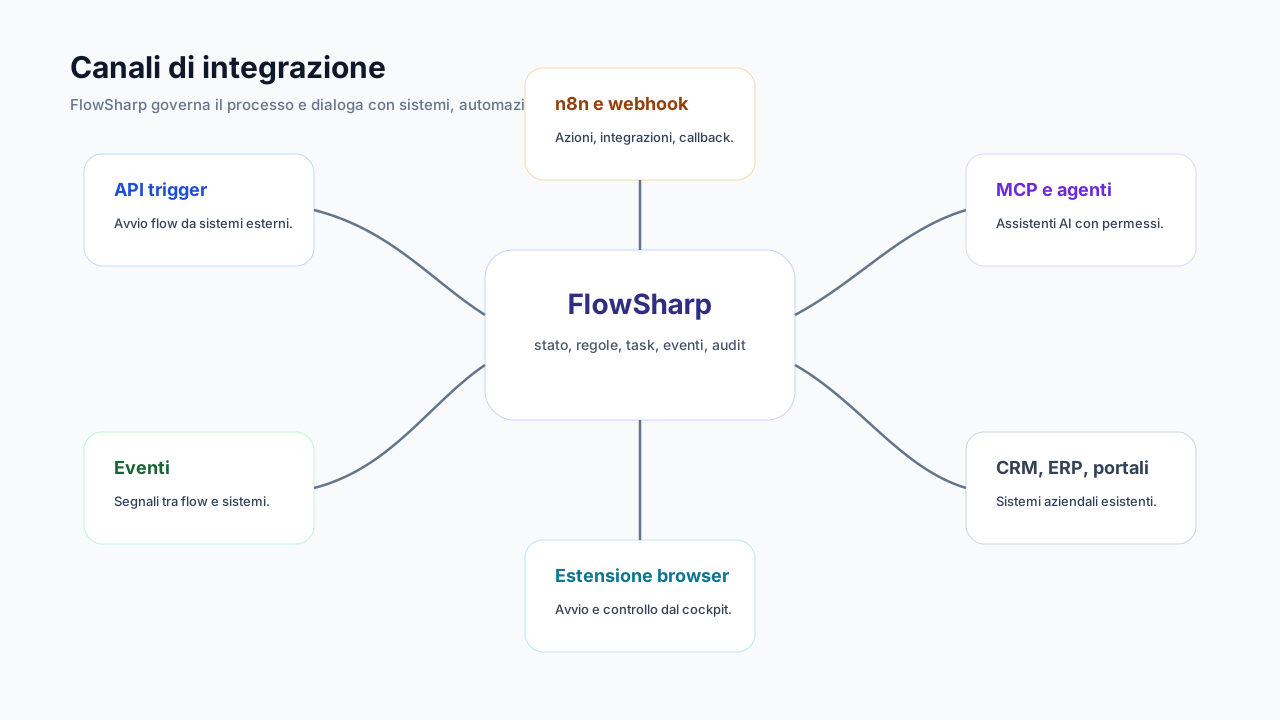
- Signed inbound webhooksOne URL and one secret for every external system that cannot use an API key.
- Verifiable outbound webhooksWhen an event happens, FlowSharp notifies connected systems, with a per-attempt history.
- Events between processesAn event starts a flow, unblocks or updates a case, or notifies external systems.
- API start (Trigger)E-commerce, CRM, ERP or portals start a case with one call and an API key.
- The map tells the truth: verified wiringEvery arc is compared with the real wiring and colored by what is actually connected.
- Multichannel alerting and acknowledgmentTime-stepped escalation policies via email, webhook or event, with measured acknowledgment.
Use cases
Frequently asked questions
Why an inbound webhook instead of an API key?
Because many systems (CRM, portals, e-commerce) can only call a URL: the signed webhook is simpler and just as controlled.
How do I verify the signature on my side?
With the same HMAC and timestamp scheme. FlowSharp provides a ready example to copy.
Can events link processes of different departments?
Yes, and it is visible on the Process Map with verified wiring.
What happens if an event is not delivered?
It stays in the history with an honest status and, if necessary, in the recoverable dead letter.