
The process map that tells the truth.
Not a drawing to update by hand: every arrow is compared with what your flows actually do.
- For
- Process owner
- IT
The problem
Process maps go stale the day after the workshop. An arrow drawn between "Order" and "Invoicing" does not say whether the two processes are really connected, whether the link is active, or whether it broke with the latest change. So the map becomes a slide, and the truth stays in the head of whoever configured the integrations. Anyone deciding where to intervene looks at a drawing that may be true, false or simply outdated, with no way to tell without asking someone. Manual work, meanwhile, usually does not appear at all: the map describes automation and forgets people. FlowSharp turns the map into a verification tool: every edge is compared with the real wiring, and the result is a color, readable at a glance, that says what works and what does not.
Map edges
- Order → Invoicing · wired
- Order → CRM · partial
- Offer → Order · drawn only
- Return → Warehouse · not active
- Confirmation → Shipping · broken
Tooltip on the red edge
- Event ordine.confermato: no active listener
How it works
1You draw the macro-process
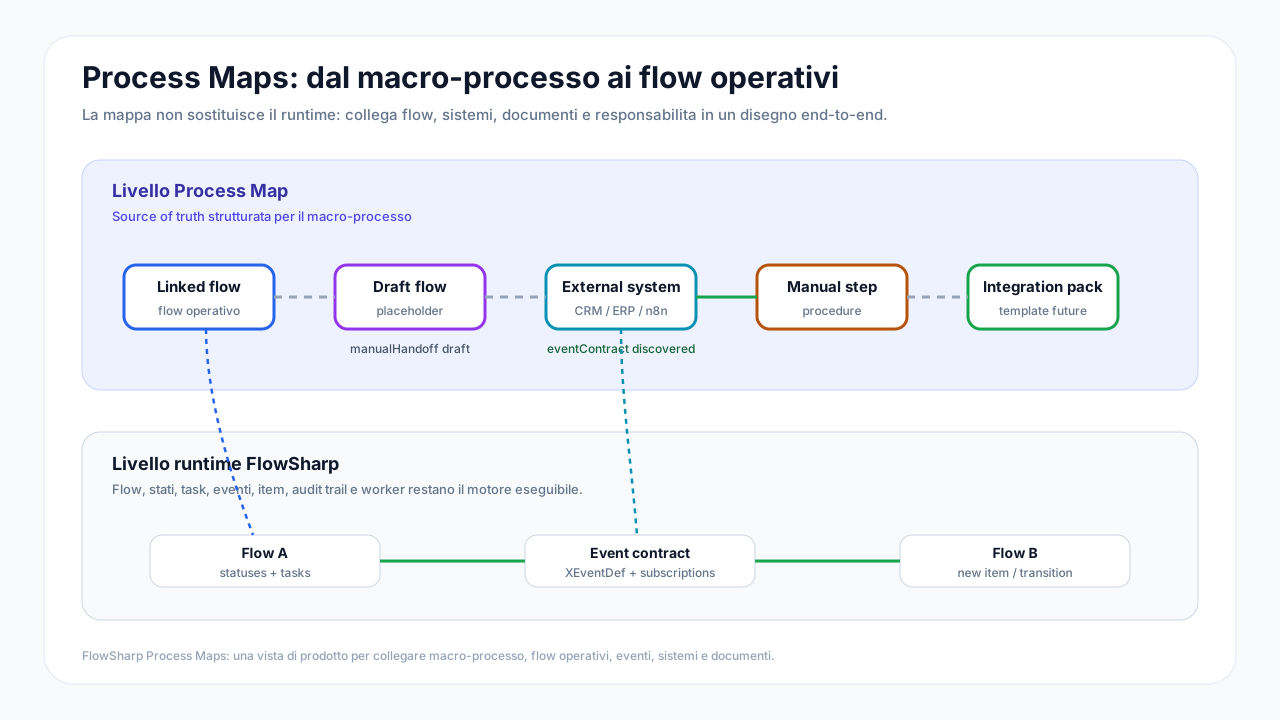
Seven node types: connected flow, draft flow, external system, manual procedure, document, human actor, integration placeholder. Manual work sits on the map at the same level as automation, because a real process is made of both and the map must show them together.
2FlowSharp verifies every edge
Each link takes a color according to the real wiring: green wired, amber partial, dashed grey drawn only, indigo configured but not active, red broken. There is no need to read logs or configurations: the health of the link is written on the edge itself.
3It discovers what is missing
"Detect connections" finds links through events that really exist between flows and proposes them; edges that are no longer valid are flagged as obsolete. The map therefore not only checks what you drew, it also shows what exists without having been drawn.
4You wire from here
The Wire button creates the event, enables starting from an event and generates the HTTP snippet ready for the external system. "Unlink" first shows what would remain active, so a removal never leaves orphaned pieces behind.
Specifications
| Node types | 7 |
|---|---|
| Link types | manual handoff, event contract |
| Edge states | wired · partial · drawn only · not active · broken |
| Start badges on nodes | manual, API Trigger, from event, from agent |
| Node version | follows the published one or is pinned to a version |
| Diagnostics | broken links, events with no emitter or listener, flows with no way to start |
An operational example: five edges, five states
On a Process Map each link between processes has a wiring state. In the example: Order to Invoicing is wired, meaning the link is drawn and works. Order to CRM is partial. Offer to Order is drawn only: it exists on the map but no mechanism runs it. Return to Warehouse is not active. Confirmation to Shipping is broken, and the edge is red. Hovering over the red edge, the tooltip explains the reason: the event ordine.confermato has no active listener. The advantage is that the map does not describe an ideal process but what actually happens between departments. Whoever looks at the map immediately tells a drawn intention from a working integration. The states in the diagram beside it are an illustrative example, not a client's data.
How to use wiring in reviews
Use wiring as a checklist before a process review. Start from the broken edges: each declares its cause, and fixing it usually means activating a listener or correcting an event. Then look at the drawn-only edges: they are unkept promises, and must either be implemented or removed from the map. Partial edges deserve a specific question to whoever manages the process: which part is missing? Inactive edges can be legitimate, for example if a flow is not yet in use, but someone should have decided that. Because the map is calculated on real links and not on the drawing, once an edge is fixed its state changes by itself and the improvement can be shown. This makes the map a governance tool, not just documentation, useful to process owners and to those who look after integrations.
Related features
- End-to-end process mapsFlows, systems, documents and manual work on the same map, at the same level.
- Map health and diagnosticsHealth badge, clickable diagnostics and operational alerts when something gets stuck.
- Four lenses: Design, Activity, Time, CostThe same map read over 7, 30 or 90 days: activity, time and cost, measured and estimated always kept apart.
- What-if simulationPick the nodes to automate and get monthly saving, investment, residual cost and payback time.
- Events between processesAn event starts a flow, unblocks or updates a case, or notifies external systems.
- Design the macro-process before building it"Draft flow" nodes that become real flows in one click when you are ready.
Use cases
Frequently asked questions
Do I need to have built the flows already?
No. You can draw "draft flow" nodes and turn them into real flows when you are ready.
Does the map show external systems?
Yes, as dedicated nodes. Wiring verification covers the links that pass through FlowSharp.
Does it update itself?
The map's health is recalculated when a connected flow changes, with an in-app notification.
Can I export it?
Yes: as a documentation PDF or as a portable package with the flows included.